Showing posts with label review. Show all posts

Tuesday, December 06, 2016

Anova Precision Cooker (Wi-Fi)

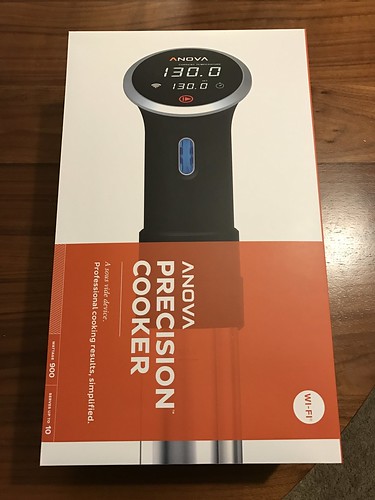
IMG_0743

I was one of the backers of Anova’s Bluetooth precision cooker when it was on Kickstarter. It was useful and reliable. I started doing a lot of sous vide after I got it (because I really like meat and seafood). When their Wi-Fi version came out, I really want one. And finally, it’s on discount so I bought one.

The box looks nicer and bigger than the tube that came with the Bluetooth version. There are more friendly informations in it to help you get started. Overall, those are useful for new customers but are meaningless to me. I would just install the app and start cooking.

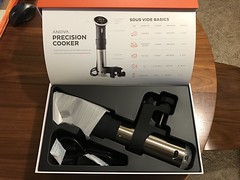
IMG_0744 IMG_0745

The first problem I ran into is it couldn’t connect to my Wi-Fi. I read through their troubleshooting for a few times and wondered what was wrong. I thought maybe because I had 5GHz network sharing the same SSID as 2.4GHz network, but I couldn’t turn it off because it’s Eero. What else could be wrong? Anova said Wi-Fi password should be between 8 and 18 characters. Mine is definitely much longer than that. I changed the password and it worked.

Changing Wi-Fi password isn’t free though. I have other smart things connected to my Wi-Fi, for example my Amazon Echo. After changing the Wi-Fi password, I have to update all these devices. None of them have password length limit. Anova is the first one that has such weird restriction.

Naturally my next step was to compare it with the Bluetooth version. They look almost exactly the same. You can only tell the difference by looking at the max/min water level marker. Their temperature readings were also different, so I got to run calibration.
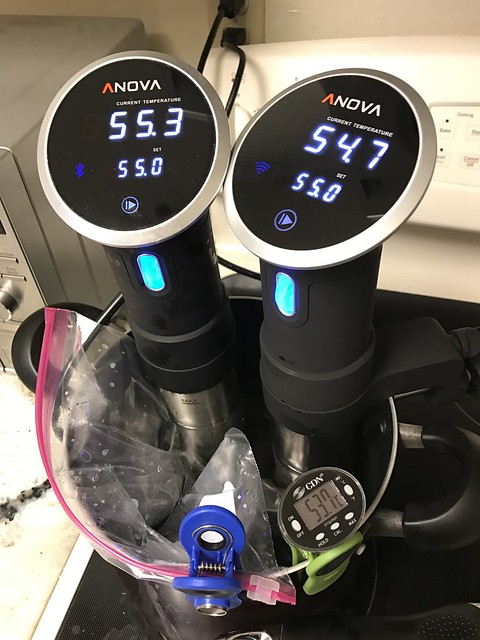
IMG_0746

When I received my Bluetooth version from Kickstarter, Anova said the first batch was not correctly calibrated. They said we could ship it back for calibration or we could go through ice bath to calibrate by ourselves. I was too lazy to do either one, so I expected it to be slightly off.

Now they were different, and they were both different from my thermometer, I wanted to calibrate. I didn’t know which one to trust, so I chose to use my thermometer as standard. (I’m still too lazy to do ice bath, because I don’t keep ice in my freezer.) I used their apps to adjust the offsets. In the end they were within 0.1 degree difference and I was happy with that.

Overall I like the Wi-Fi version, even though I haven’t had a chance to use it through Wi-Fi yet. The reason is I don’t cook at workdays, so it’s not common for me to start cooking while away. For food safety reason, I should keep the food in ice bath before starting cooking from remote. That’s another hard to satisfy requirement.

Friday, December 13, 2013

Pencil from FiftyThree

I just received my Pencil from FiftyThree today, and here’s how it looks like and how it feels like.

2013-12-12 20.35.41 2013-12-12 20.38.35

It comes within a nice paper tube. When you open it, you will notice the packaging is really nice. You would first pull out the Pencil, and then you would see the quick start manual. The plastic wrapper around the Pencil says you have to charge it first, so I pulled out the battery and plug it into an USB port.

2013-12-12 21.41.42

It took maybe an hour to charge, and then the light turned from yellow to green. I don’t know how long the battery will last, but I think Bluetooth LE shouldn’t use a lot of energy. Now let’s start the Paper app.

2013-12-12 21.44.24

I picked the walnut version. My piece of walnut wood doesn’t look as good as advertised, with less wooden color strips but more of those small cracks on the surface. I wouldn’t say it’s ugly, but just not as polished as I imagined. I tried to smell it. It was a silly idea because it doesn’t smell like wood at all.

2013-12-12 21.46.24

Establishing connection with the app is much easier than Pogo Connect. You don’t need to install another app (of course), and you don’t need to click a button on the stylus to initiate the connection. Just use the Pencil to touch the pencil icon in Paper for a few seconds and it’s connected. Then you can start drawing without worrying about how it recognizes the Pencil (including the eraser), your fingers and your palm.

2013-12-12 23.17.47

During my drawing, I noticed that Paper might recognize the Pencil (including eraser) as my finger. I guess it’s because I was not pressing the Pencil hard enough, so Paper received a touch without receiving Pencil down through Bluetooth. I tried to press harder when I use the Pencil and it seems that fixed the issue.

Drawing with Pencil is quite comfortable to me. It’s easier to control where the tip goes compared to Pogo Connect (or maybe my control over stylus has improved). The erasing area is not as big as the eraser, so I’d rather use undo if possible, because erasing a large area needs a lot of movement. Overall, I like drawing with Pencil more than with my previous styli, and $60 seems like a reasonable price to me.

Saturday, August 31, 2013

W/Me - health tracker or notifier?

If you don’t know what W/Me is, here’s its Kickstarter introduction:

It’s the fastest Kickstarter project delivery I’ve ever seen. It’s funded on 7/2 and shipped on 8/26. That’s less than 2 months. I don’t know if they’ve secured funding and built the thing then used Kickstarter to get some early adopters. This speed is really amazing to me.

I got mine a few days ago. It came with a Kickstarter limited edition wooden box. Inside the box, there’s W/Me plus 3 color bands. (I grabbed the last early bird spot at the last moment. Maybe somebody got cold feet?) There’s quick start guide, alcohol pad and a small note that says “the device may not be functioning perfectly in some particular individuals”. (Hope I’m not that special!)

Untitled

Untitled

Untitled

Before I received my W/Me, I noticed some Kickstarter backers said that it’s too small for them. However it’s obvious that W/Me is too large for my wrist. That made me wonder whether I should wear it around my wrist or around my forearm. (Later I found out I have to wear it around my wrist.)

Setting up the Bluetooth was easy, but starting the first measurement was rough. It kept saying that it couldn’t get good signal. I tried to touch it with different positions and my first measurement was still ended with a time-out. So I cleaned the sensors and tried again. The measurement wasn’t easy. It needs 3 minutes of data and any interruption requires at least 5 seconds to resume. At the end of the measurement I got 3 numbers: Agility, ANS Age, BPM. The problem is I don’t know their accuracy and I can’t verify them. (I can verify BPM with another app.)

W/Me measurement

After a few measurements, I started to learn how to do it properly. The best position to measure is above my wrist bone. Touching that area of the skin will give me stablest signal. However that only means no interruption. It doesn’t mean anything in terms of data quality. When the app shows a line that doesn’t look like a normal pulse line or a BPM way beyond 100, it’s collecting garbage. (Garbage in, garbage out.) So the real goal is to get data that makes sense to me.

W/Me measurement

(As you can see, when I tried to touch two buttons at the same time in order to take this screenshot, the pulse line went awry immediately.) I have to say that collecting the right data takes determination plus a little bit of luck. That discourages me from taking more measurement and makes coaching really hard to follow. Without the right data there’s no feedback, and without feedback coaching is a useless feature.

Besides health tracker features, W/Me has some small utility features. For example, in flashlight mode it turns on all its white LED lights and that’s actually brighter than my iPhone screen when in dark. It can be used as a remote control to iPhone camera, but I wish it works with Camera+. (Update: It actually works with Camera+ but in a weird way. I need to turn on find-my-iPhone and that signals Camera+ to take one photo.)

W/Me displayW/Me displayW/Me display

It vibrates when there’s new email or Facebook notification, but the unread number disappears so fast that I usually only get to know that there’s unread email or there’s unread Facebook notification. I wish they increase that delay (or allow me to adjust it) in next update. It can signal the iPhone to start playing W/Me theme music, which acts a find-my-iPhone feature. However when my iPhone was connected to a Bluetooth speaker, that music was played through that Bluetooth speaker, which makes the feature useless.

In conclusion, W/Me is a cool gadget but it’s not something that “just works”. If you just want some reliable health tracker, go back to Fitbit. To me, as long as it doesn’t break like Jawbone UP, I’m okay with it.